


It’s 6PM, your calendar has finally cleared, and you’re opening the work you meant to start this morning. Sound familiar?
When you lead a team, it’s hard to manage your time because your day quickly starts to belong to everyone else.
Meetings run back to back, and messages fill every gap in between. The strategic work you were hired for slides into your evenings or quietly moves to next week.
If that’s where you are right now, you’re not alone. Almost every manager we coach hits this wall at some point. It says nothing about your ability, and it’s very solvable.
First, we’ll look at what time management really means for leaders and why it matters. Then you’ll find 10 realistic tips built for a full calendar.
You won’t need color-coded planners or 5AM routines. Each tip is a small change you can start this week.
What is Time Management for Leaders?
For a leader, managing your time means deciding what deserves your attention and protecting the time to do it.
Most of us treat time management as a scheduling problem. Researchers define time management as a form of decision-making, and that’s how we coach it at Elevate. In plain English, to manage your time well you do three things:
- Structure it by planning around your priorities.
- Protect it by saying no and limiting interruptions.
- Adapt it by re-prioritizing when things change.
So the question shifts from “How do I fit more in?” to “What deserves my attention, and what can I stop doing and delegate?”
Why is Time Management Important for Managers?
How much of your week actually goes to your people? McKinsey found that middle managers spend only about 28% of their time managing and developing people, the part of the job that should come first. Nearly a whole day a week goes to admin instead.
When time and energy run thin, your thinking suffers. Microsoft’s Work Trend Index found that people who struggle with time and energy are 3.5x more likely to struggle with innovation and strategic thinking, the work only you can do.
Managing your time well pays off for you, too. A peer-reviewed four day week study found that cutting meetings and low-impact tasks significantly reduced burnout and improved mental and physical health.
Gallup found that managers who keep individual-contributor work below 40% of their time are more engaged than those who spend more.
10 Tips to Manage Your Time
Your calendar’s already full, so these tips to manage your time are built to fit around it. Pick one or two that suit your situation and add more as they stick.
1. Use Elevate’s Wheel of Work to Audit Your Time
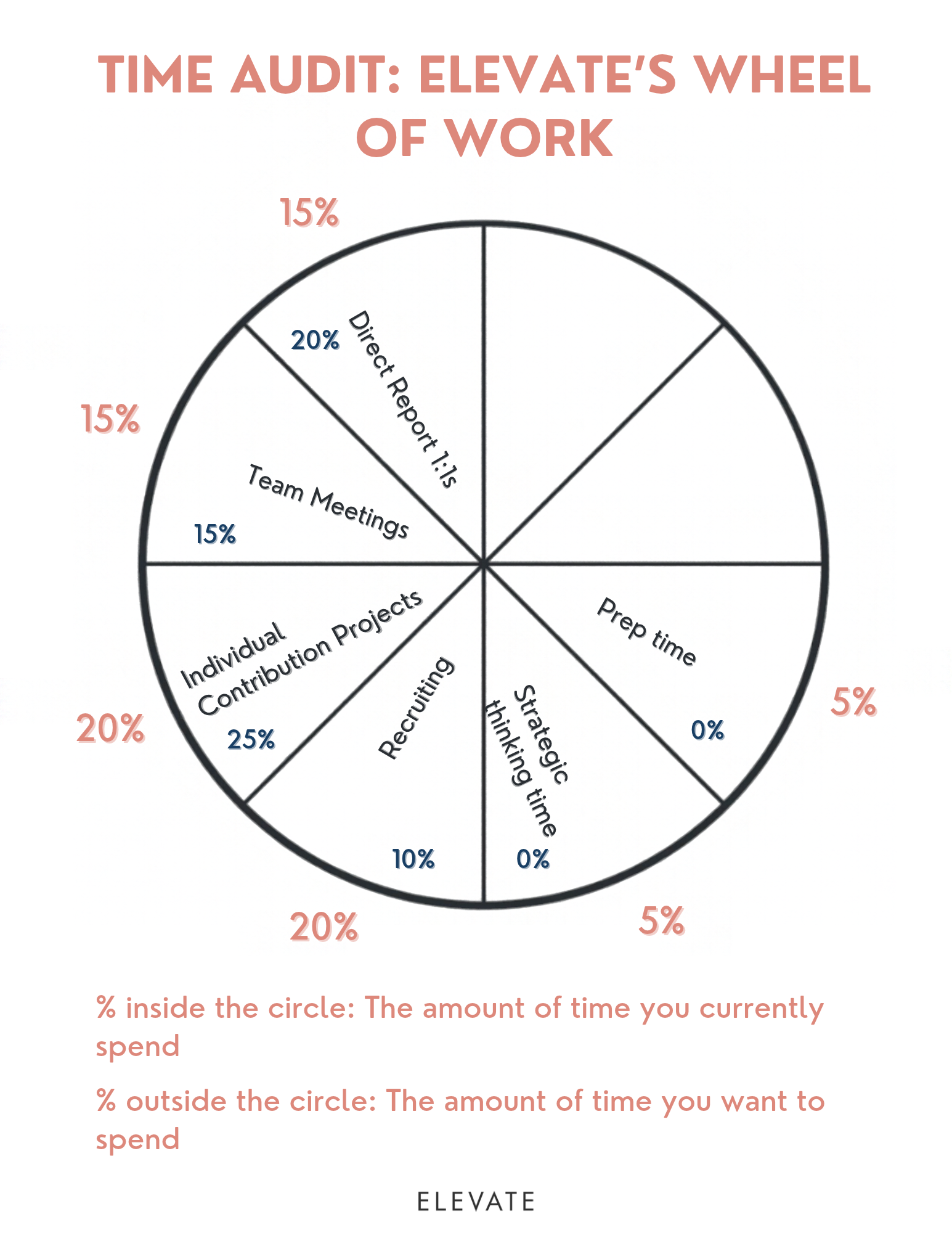
The Wheel of Work is a quick visual audit that shows where your time goes compared with where it should go. Most of us only guess at this, so seeing it on one page shows exactly what to change.
Draw a circle on a sheet of paper. Divide it into the parts of your job, such as 1-on-1 meetings, admin work and individual-contributor projects. Add what you should be doing but aren’t, like strategic thinking time. Then use your calendar to write the percentage of a typical week you spend on each.
Next, answer these three questions:
- What were you hired for, and what are you uniquely good at?
- Which part of your job will have the biggest business impact in the next three months?
- What do you enjoy doing the most?
Then write your realistic ideal percentages around the edge of the wheel for each part of your job. Balancing realistic and ideal is hard, but give it a shot!
Where are the biggest gaps? What insights did you have? Clients often tell us, “I had NO idea I was spending so much time on X!”
Now you can see where your time goes, and that’s your starting point. Begin with the biggest gap or the work with the highest impact, whichever feels right to you. What matters is that you pick one thing to reorganize first.
2. Reset Expectations to Free Up Time
Once you know where your time is going, the next step is often a conversation. Who do you need to talk to so you can buy back some time?
That might mean:
- Moving a deadline
- Stepping back from a project
- Reallocating resources
- Delegating work
These conversations feel uncomfortable, so most managers avoid them and quietly take on the extra work. We coached a manager who finally asked her director to push a launch back by two weeks. The answer was yes in under five minutes. She’d been dreading that conversation for a month.
3. Cut Unnecessary Meetings With a Four-Question Audit
Meetings usually take up the largest share of a manager’s calendar, which also makes them the easiest place to win back time.
List every recurring meeting you attend, then ask four questions about each one:
- Is there a clear decision or outcome?
- Do I need to be there?
- Could it be shorter or less frequent?
- Could it be an async update instead?
If a meeting fails most of these, it’s a candidate to cut.
For the meetings you keep, default to 25 or 50 minutes. That buffer gives you a few minutes to note actions before the next one starts. Ask for an agenda, and politely decline when there isn’t one. You could say, “Happy to join once there’s an agenda. What do you need from me?”
4. Block Focus Time for High-Impact Work
The work that moves your team forward is rarely urgent, so it’s usually the first thing to get cut. Start by listing the important, low-urgency work that needs a slot in your calendar.
For example:
- Career development plans
- A vision for your team
- Fixing an outdated process
- Prep for 1-on-1s
Decide exactly what you’ll work on in each block and write it into the calendar entry. A block labeled “focus time” is easy to give away. One labeled “Draft Q1 team vision” is harder to surrender.
Be realistic about length. Even 90 minutes a week of strategic thinking time can make a big difference.
Protect your personal time the same way. Lunch and breaks belong in your calendar too.
5. Check Email and Messages at Set Times Each Day
Every time you check your inbox mid-task, it costs you focus. Do that dozens of times a day and the cost adds up fast.
Instead, pick two or three set times a day to process messages, such as mid-morning and late afternoon. Turn off non-essential notifications so nothing pulls you back in between those slots.
Then tell your team how to reach you when something is truly urgent, whether that’s a phone call or a direct message. Most people skip this step, but batching depends on it. Without it, you’ll keep checking “just in case.”
{{blogcta3="/style-guide"}}
6. Delegate Effectively With Elevate’s Delegation Matrix
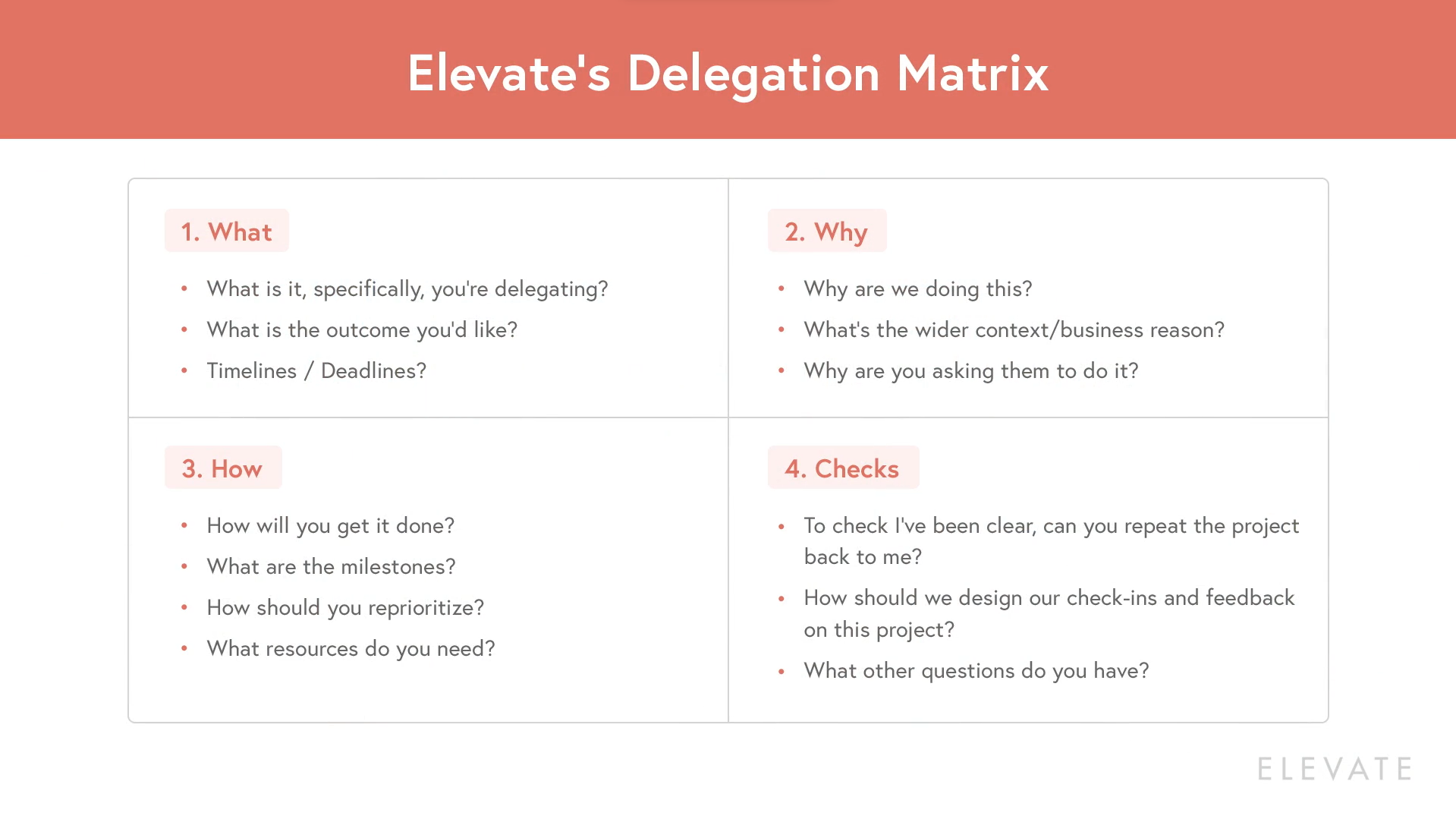
Delegation is one of the fastest ways to free up your time. Yet many managers hand work over in a rush, then spend twice as long fixing it.
Elevate’s Delegation Matrix helps you set the work up properly from the start. It has four parts:
- The what. Explain the task and the outcome you need, including what success looks like. Share deadlines and constraints up front.
- The why. Give the business context and explain why you chose this person. With that context, they can solve problems without coming back to you.
- The how. Agree on milestones and resources, and talk through how they’ll reprioritize their other work. Be more directive with junior people. Let senior people come up with the answers.
- The checks. Ask them to play the plan back to you. Then agree how often you’ll check in and what’s urgent enough to escalate. Doing this up front stops you from micromanaging later.
7. Say No at Work, or Say Yes With Parameters
Every yes to one thing uses up time you could spend on something else. Before you agree to anything, ask yourself, “What’s the cost of me saying yes to this?”
When the answer is no, decline warmly and clearly. Try: “As much as I hate to decline, I’m going to have to bow out of this one.”
If the request isn’t really part of your role, redirect it: “I think Mara has more details on this.”
When a flat no isn’t realistic, say yes with parameters. Set boundaries around how and when you help. For example:
- “Can you pop some time in my calendar later this afternoon?” This protects you from interruptions.
- “What have you tried so far?” This sets the expectation that people try first.
- “I can take this on, but what would you like me to deprioritize?” This makes the trade-off visible, which helps with senior stakeholders in particular.
8. Set Response-Time Norms to Stop After-Hours Work
When response times are unclear, people assume they need to reply right away. That’s how one quick late-night question turns into a team that never fully logs off.
Agree on response-time expectations for each channel. For example, chat might need a reply within a few hours and email within a day. Write the norms in a shared doc.
If you work late, use scheduled send so your messages land the next morning.
Most importantly, log off visibly yourself. Your team takes its cues from your behavior, and a norm won’t stick if you’re the one breaking it.
9. Use AI to Save Time on Routine Work
AI can save you real time when you point it at the right work. It’s strongest on tasks where a solid first draft or a quick summary gets you most of the way there:
- Triaging email and drafting replies
- Writing first drafts of documents
- Recapping meetings you decide to skip
Check its work on anything that needs judgment, such as feedback for a team member or a message to a senior stakeholder.
Keep your expectations realistic, too. AI can speed up the work around your meetings, but fixing the meetings themselves comes down to your habits and your team’s norms.
10. Pick One Daily Power Action That Moves Your Top Goal
A long to-do list makes every task look equally important. This quick exercise cuts through the noise and helps you get things done by pointing you to the one thing that matters most today.
- Put your to-do list aside.
- Remind yourself of your team’s most important goal.
- Imagine standing in the future where that goal has been achieved.
- Ask yourself, “What’s one action I took today that got me here?”
Then block time for it today and protect that block.
Manage Your Time With Intention
Every hour on your calendar is a decision. When you manage your time with intention, those decisions start working for you and your team.
We’ve seen this over and over in coaching. The managers who win back their time usually start with one change. Once it sticks, they add the next.
What could you change by Friday? If you’re not sure, Elevate’s Wheel of Work is a great place to start.
Imagine what one extra hour a week could do. That’s time for the strategic thinking only you can do, or a career conversation with someone on your team.
Pick your one thing and put it in next week’s calendar. That hour is yours to take back.


